
Webcam
Your phone as a webcam
A phone's camera is almost always better than a laptop's. SeamDroid turns it into an ordinary webcam for your Linux or Windows 11 computer — Zoom, Google Meet, Telegram, OBS and the browser all see it.
Works over wireless or USB debugging — ADB. Turn it on once in the phone's developer options; no root needed. How to turn it on
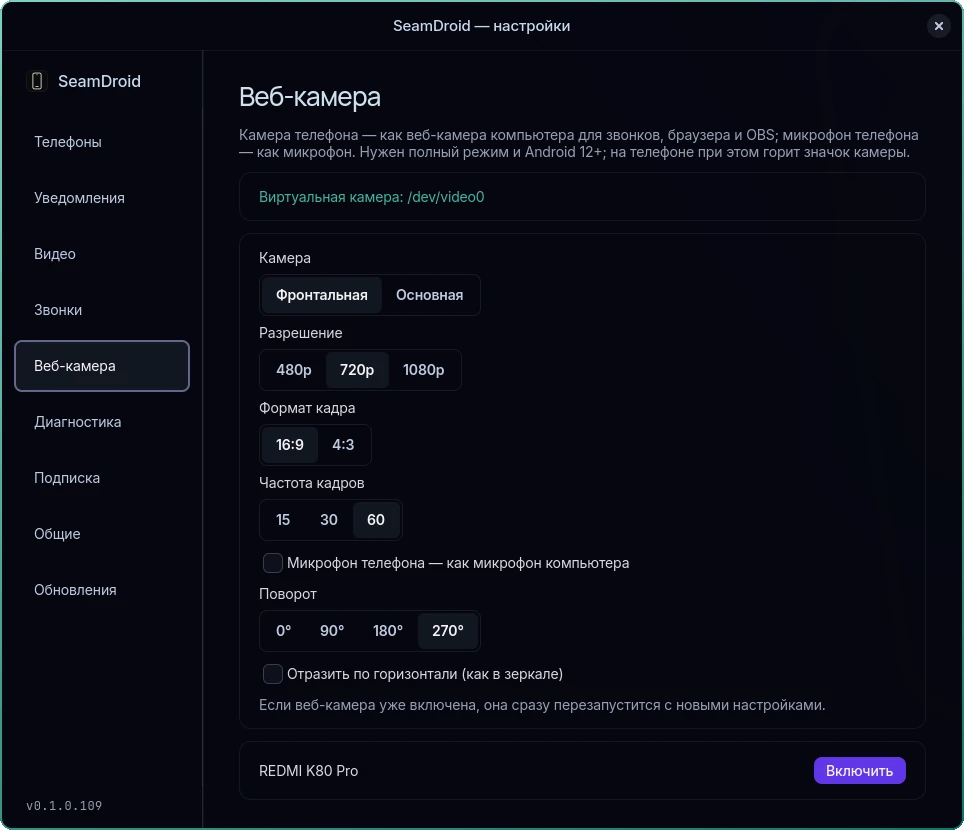
What you can set
- Camera: front or back.
- Resolution and shape: 480p, 720p or 1080p, 16:9 or 4:3.
- Frame rate: 15, 30 or 60 fps.
- Rotate and mirror: 0°, 90°, 180° or 270° — to match how the phone stands; flip left to right.
- The phone's microphone as the computer's microphone — one checkbox.
Changes apply right away, even while the camera is in a call. Test camera shows the picture before the call.
Free and with a subscription
For free, the webcam runs at up to 720p and 30 fps. With a subscription — up to 1080p and 60 fps. One key works on three computers.
Linux
The first time, SeamDroid sets up the virtual camera itself — the system asks for your password once. The phone's microphone shows up as a separate audio source. Every program sees the camera: the browser, Zoom, Telegram, OBS.
Windows
Windows 11 is required: the camera is set up once, and Windows asks for an administrator confirmation. For the phone's microphone SeamDroid installs the free VB‑Audio Virtual Cable in one click; in the call, pick CABLE Output as the microphone.
How to turn it on
- Connect the phone in full mode — over wireless debugging or a cable (how).
- Click Webcam in the tray, or open Settings… → Webcam.
- Pick the SeamDroid camera in your video call app.
While the camera runs, the phone shows its camera indicator — that's Android telling you the camera is in use.
Questions and answers
Which phones work?
Android 12 or later, in full mode (wireless debugging or a cable).
Does it work on Windows 10?
No, virtual cameras arrived in Windows 11. The rest of SeamDroid works on Windows 10 too.
Which apps does it work in?
Any app that lets you pick a webcam: Zoom, Google Meet and other browser services, Telegram, OBS.
Can I use the phone's microphone?
Yes. Tick “Phone microphone as the computer's microphone” in the webcam settings.
How much does it cost?
Up to 720p and 30 fps is free. Up to 1080p and 60 fps comes with a subscription.
Ready to try it?
Start for free: download SeamDroid for Linux or Windows.